Polski
Your website.
One workspace.
Create multilingual websites, manage teams and facilities, and use AI while keeping editors in control of publishing. On your server. On your terms.
Your Private, Personalized AI Chatbot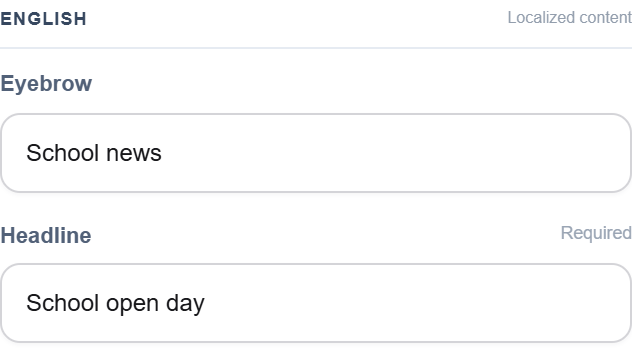 Enlarge the editor view
Your Private, Personalized AI Chatbot.
Your knowledge. Your website. An assistant that speaks for your organisation.
Teach it with your own texts, documents and approved website pages. Sense CMS brings your materials into a knowledge base so your integrated chatbot can help visitors with answers grounded in your information.
Your knowledge base is managed in your CMS. Replies use the AI provider you configure.
ParentWhen can we visit the school?
School assistantOur open day starts on 18 May at 10 am at Central School, 4 Linden Street. You can meet the teachers and visit the classrooms. Source: school open day announcement
One website address. Your nearest branch’s own website.
Give every location a recognisable place within your brand. Visitors enter one shared website address and can be directed to the nearest branch’s personalised website, with its own offer, local news and contact details.
What do you get with Sense CMS?
Start with a shared foundation for your website and team. Choose the hosting, everyday tools and integrations that fit your organisation. We also build custom addons and connections for requirements unique to your business.
Closer to your team. Wherever work takes you.
A conversation, a visit, a change of plan. Explore the APP Sense CMS interface for keeping everyday communication and schedules together — on a phone and at your desk.
Mobile & desktop interfaceAndroid · iOS · Windows · macOS · Linux
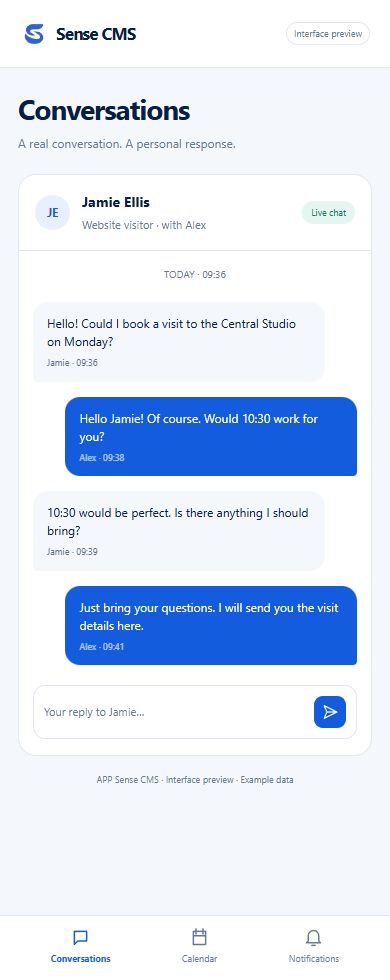
People, not just messages
Follow a conversation between a website visitor and a team member. Personal support stays at the centre.
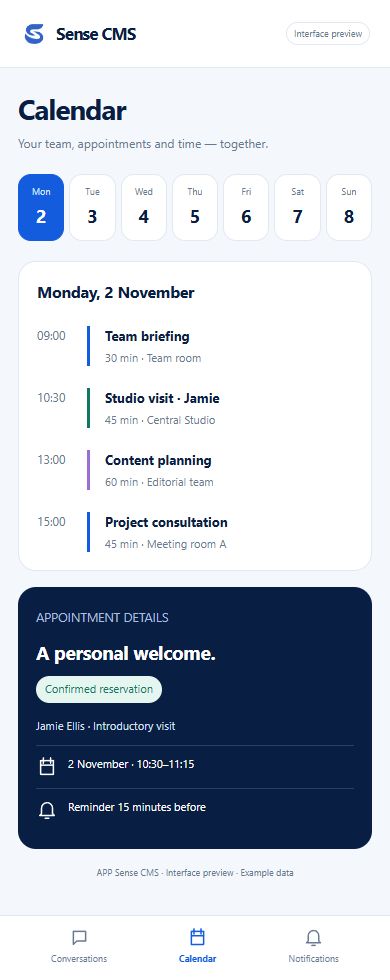
A clearer working day
A daily schedule, a reservation and its details. One view brings people, places and time together.
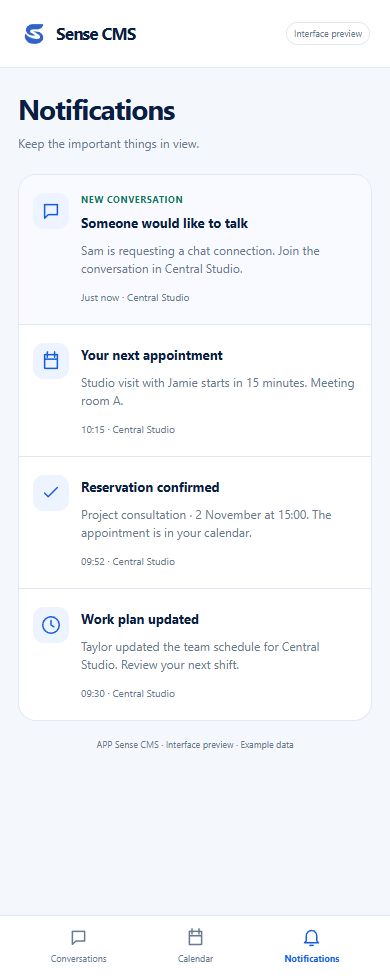
The right moment to respond
A chat connection request, an appointment reminder or a schedule change — with the context that matters.
What can your team do in one workspace?
From first draft to publication, see how editors manage pages, translations and content for each location.
An independent workspace
Manage pages, posts, media, navigation and SEO from one administrative environment. Your public theme can change without replacing your workspace.
Many facilities. One foundation.
Organise locations, teams and their content with scoped access. Keep local responsibilities clear while managing your organisation centrally.
A theme of your own
Choose a compatible theme or create one for your project. Page content and its public address belong to Core; the theme decides how they look.
Good foundations start before the homepage.
Installation begins with a verified license, followed by server checks, database setup and your owner account. Keep private application files outside the public document root.
AI that keeps editors in control
Draft and refine Page Builder sections and posts, maintain a governed Knowledge Base for RAG, and choose your own configured AI provider. Human review stays in the publishing flow.
Start with a foundation. Make room for possibility.
A website should be able to evolve with your organisation. Sense CMS separates the core workspace from themes, modules, plugins and addons — so each part has a clear role.
Meet the ecosystem
Your visual identity.
02 / CAPABILITIESModules ↗Your application's features.
03 / CONNECTIONSPlugins ↗Your service integrations.
04 / WORKSPACEAddons ↗Your additional tools.
Package availability and compatibility are listed separately. Check release status →
Change your design. Keep your content and URLs.
Build a distinctive website without tying your content to its design. Your team keeps a familiar workspace while your public experience evolves.
Explore theme development- 01Keep your content
Pages and their addresses belong to the CMS, not the theme.
- 02Shape the experience
Change your presentation without replacing the administration panel.
- 03Choose your infrastructure
Deploy on your own infrastructure or let us host Sense CMS on our servers.
Your next website starts with a conversation.
Sense CMS is in active development. Explore the implemented foundation, read the technical documentation and check release availability.