

 Polski
AI content management, built into Sense CMS
Provider-neutral editorial AI, controlled RAG, a source-aware visitor assistant, budget guardrails, human handoff and local training-data preparation.
 Sense CMSYOUR DIGITAL WORKSPACE
AI for structured editorial work
Generate or improve drafts inside Page Builder and Posts without bypassing editorial review. Suggestions remain editable and publication stays a deliberate human action.
Your Private, Personalized AI Chatbot.
Your knowledge. Your website. An assistant that speaks for your organisation.
Teach it with your own texts, documents and approved website pages. Sense CMS brings your materials into a knowledge base so your integrated chatbot can help visitors with answers grounded in your information.
Your knowledge base is managed in your CMS. Replies use the AI provider you configure.
- Your texts
- Documents
- Website pages
- 01
Give it your knowledge
Add service descriptions, practical guides and answers to common questions. Choose which materials are approved for visitor answers.
- 02
Keep it personal and current
Correct, update or disable sources as your organisation changes. Test the answers in the languages your visitors use.
- 03
Connect answers with people
Help visitors find useful information and linked sources. When a question needs a person, the conversation can move to your team.
What do “private” and “teach it” mean?
You manage a dedicated knowledge base in your Sense CMS installation and decide which sources the assistant may use. To generate a reply, the selected AI provider receives the question, relevant source excerpts and recent conversation context. Adding materials enriches the knowledge used for answers; it does not retrain the underlying model. Review provider terms and share only material suitable for visitor support.
One Core, multiple AI providers
Configure OpenAI Responses, compatible APIs, Anthropic or Google Gemini independently. Encrypted credentials, priorities and request, token and budget guardrails keep provider choice under installation control.
Knowledge Base and RAG
Combine approved website content, manual knowledge and private text documents in a local, traceable retrieval index. Sources can be included, corrected, disabled or deleted independently.
Automatic knowledge synchronization
Published pages and posts are queued for local reindexing when their content or publication state changes. Future, draft, private and excluded content stays out of retrieval.
Training data without surprise costs
Curate reviewed examples and evaluation cases, then prepare checksum-locked JSONL packages locally. Paid provider fine-tuning remains disabled until a current estimate and separate confirmation are available.
RAG visitor assistant with human handoff
Answer visitor questions from approved, indexed website knowledge, show verified source links and transfer the conversation to a person when the available context is insufficient. Daily reply and output limits keep usage controlled.
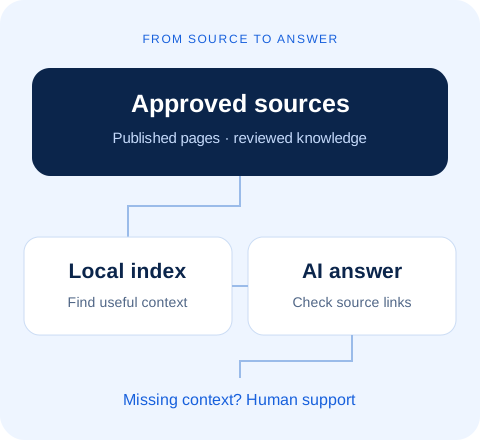
A useful answer starts with a useful source
Start with clear published pages: opening hours, contact routes and explanations of your services. Include approved material in the Knowledge Base, check indexing and ask representative visitor questions. Review the linked sources as well as the wording of each answer.
For a question such as “How can I contact this location?”, the assistant needs a current, relevant source. Missing or insufficient context should lead to clarification or human support, rather than an invented address or promise.
An editorial brief you can actually review
Give AI a bounded task: “Prepare an English introduction from these approved facts; keep the service names and contact details unchanged.” Check factual claims, tone, links and terminology before saving the suggestion.
For another language, review names, dates and local context separately. AI assistance is not an automatic translation approval or a guarantee of factual accuracy. The editor remains responsible for the published version.
Before you enable the assistant
- Choose the provider and model, then set budgets and reply limits appropriate to your installation.
- Review which approved sources may be used for visitor answers. Do not add confidential material merely because it is technically importable.
- Test known answers, missing information, both content languages and a request for human help.
- Check the knowledge queue after publication. If an answer is stale, inspect the source and index before changing the prompt.
Response time depends on retrieval, provider availability and the selected model. Human handoff also depends on operator availability; the interface should not imply an instant human response.